Friday, December 22, 2017

Top Moodle Theme of 2017

In case you missed it, MoodleNews Year In Review: The Top Ten Themes Of 2017, the Fordson Theme was ranked as the #1 Moodle theme of 2017.  Fordson, created by our very own Chris Kenniburg form Dearborn Public Schools, gives Moodle a modern look and feel that is easy for users to navigate.  

Fordson is sleek and efficient and provides a simple, clean interface. Some of my favorite features included the following:
  • Course Management Panel is a well organized display of those links previously housed in the Course Administration block. Removing blocks helps reduce clutter and modernizes the overall experience.
  • Student Dashboard which provides students with quick access to course information including: course description, teacher contact information, current grade, the course completion status, and activity links.
  • The Custom Course Category Display allows users to change the way courses are displayed within course categories. Users can customize their Moodle site by choosing from four distinct layouts.

Screenshot of the moodle.resa.net homepage showcasing the Fordson theme
moodle.resa.net
Fordson’s modern look coupled with its increased functionality make it an ideal choice for any Moodle instance. For these reasons, Wayne RESA encourages the use of the the Fordson theme.  We appreciate the efforts of Dearborn Public Schools and Chris Kenniberg for their creativity and ongoing support of all things Moodle.  

Thursday, November 2, 2017

Share Your Story


Image of a computer and book with the words "Share Your Story" and the modern moodle blog website (modernmoodle.blogspot.com)

This blog was designed to share innovative ways in which Moodle can be used to enhance instruction. Our goal is both to inform and inspire educators to rethink the way in which instruction in delivered. We believe that the best way to do this is to share real stories – your stories.  We would like to invite you to contribute to this blog; thus making it a product of the amazingly innovative and creative teachers of Wayne County.  If your students are benefitting from the power of Moodle, please email Michelle Wagner at wagnerm@resa.net. We would love to showcase your experiences on ModernMoodle.blogspot.com. 


We look forward to hearing, sharing, and learning from your stories!

Friday, October 27, 2017

H5P - Collage

Utilizing the H5P Interactive Content allows teachers to customize the appearance and layout of their posts/assignments. This type of customization is both visually appealing and functional.  This post will focus on the Collage feature, but we will delve into the other interactive components in the future.

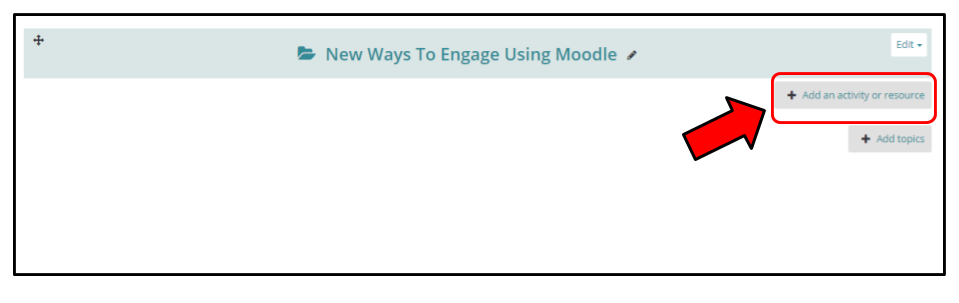
Within your Moodle course, add a new activity.
Screenshot showing the user where to click
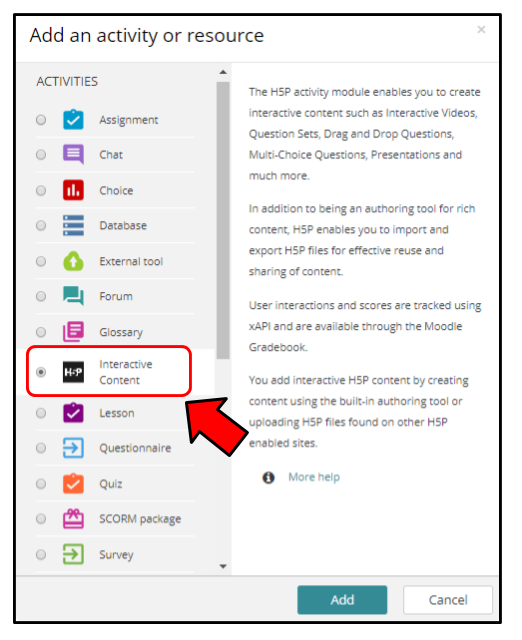
Next, select the H5P Interactive Content choice and select Add.
Screenshot showing the user where to click

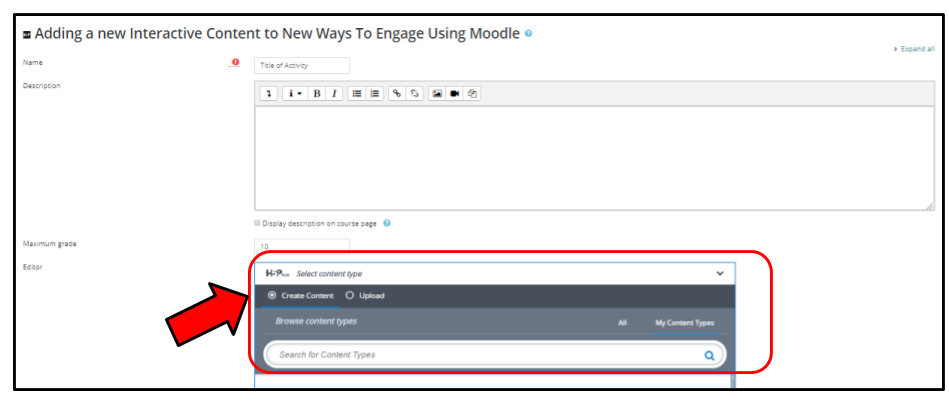
At this point, you could select any of the amazing options included within H5P, but for now, we will focus on the Collage.


Click the Use button in order to specify exactly how you would like the Collage to appear within your Moodle course. You will be able to move the images around by dragging them. You can also select an image and then use the + or - keys on your keyboard to zoom or simply hold down the Z key while moving your mouse wheel. In other words, users have a great deal of control over the way in which images are displayed.  
Shows the user where the "Collage" option will appear.

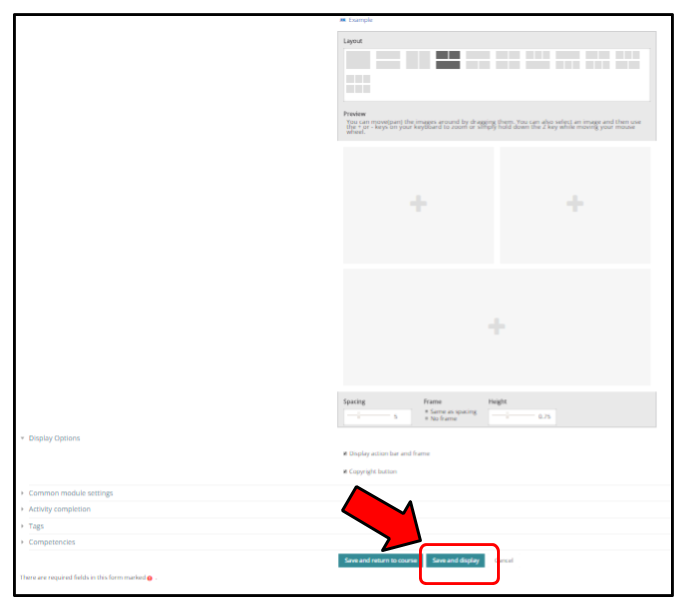
Once you are satisfied with the settings, click Save and Display in order to view the Collage within your Moodle course.

Shows the user what the screen will look like (options available) when the collage functionality is chosen.

I like to select Save and Display because it instantly allows me to view activity and ensure that it appears exactly as I intended.
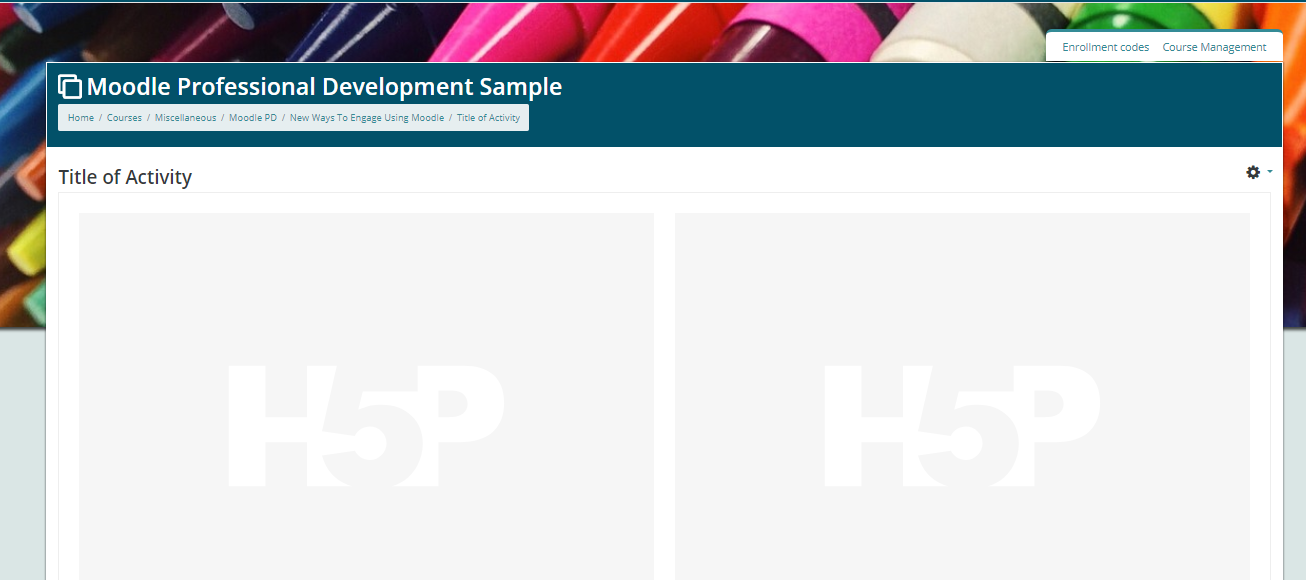
Shows the user how an empty collage will appear on their course page.

Once I turn editing off, I am able to see what the newly added activity truly looks like within my Moodle course. As you can see, it appears like a traditional assignment or post.
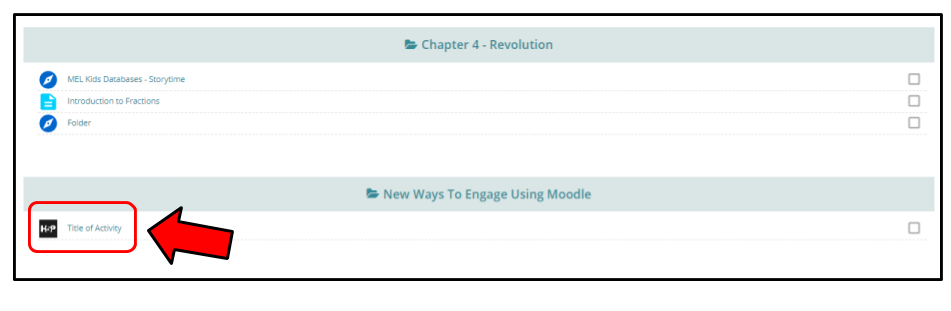
Shows an image of what the added content will look like on a course page (where the user will need to click in order to access the collage)
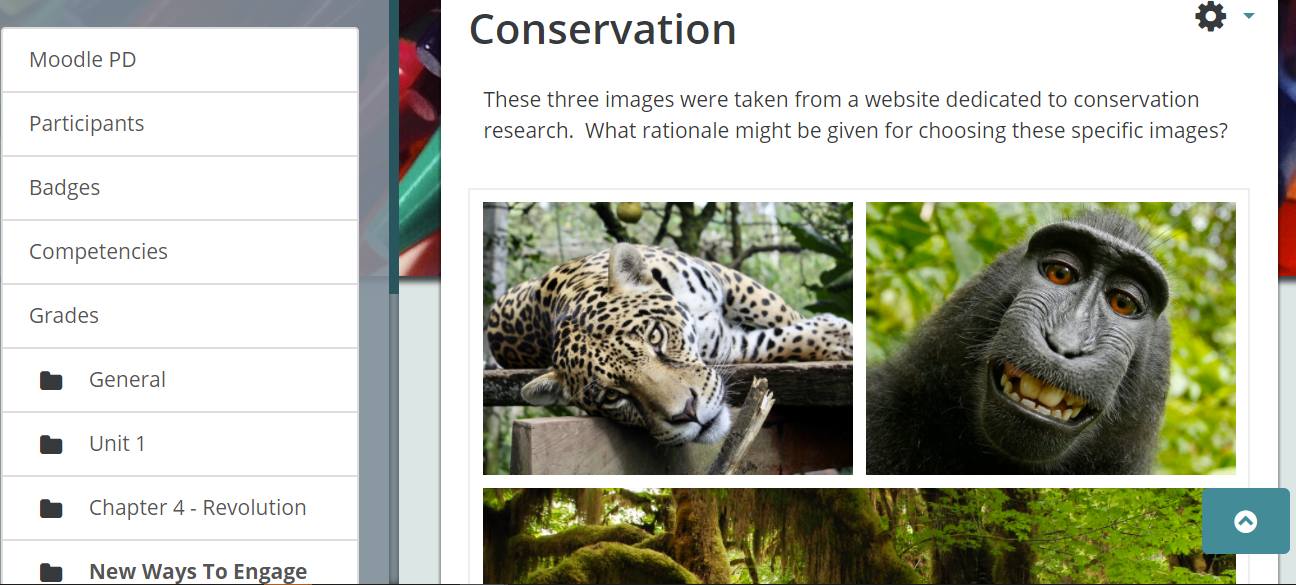
Clicking on this activity will bring up the collage created by the teacher. What the students do with the collage is completely up to you.  While the example shown asks students to consider why these images represent a specific concept, a teacher might simply use the functionality of the collage to share photographs of students engaged in a learning activity.

Screenshot showing a completed collage with images from the rain forest that represent the common theme of conservation.

Tuesday, October 10, 2017

Whatever Your Model - Moodle Can Help!

Education is continually evolving as educators seek innovative ways to help students engage in deep levels of learning. Moodle is an open-source Learning Management System that can support teachers in their endeavor to alter the way in which content is delivered.  


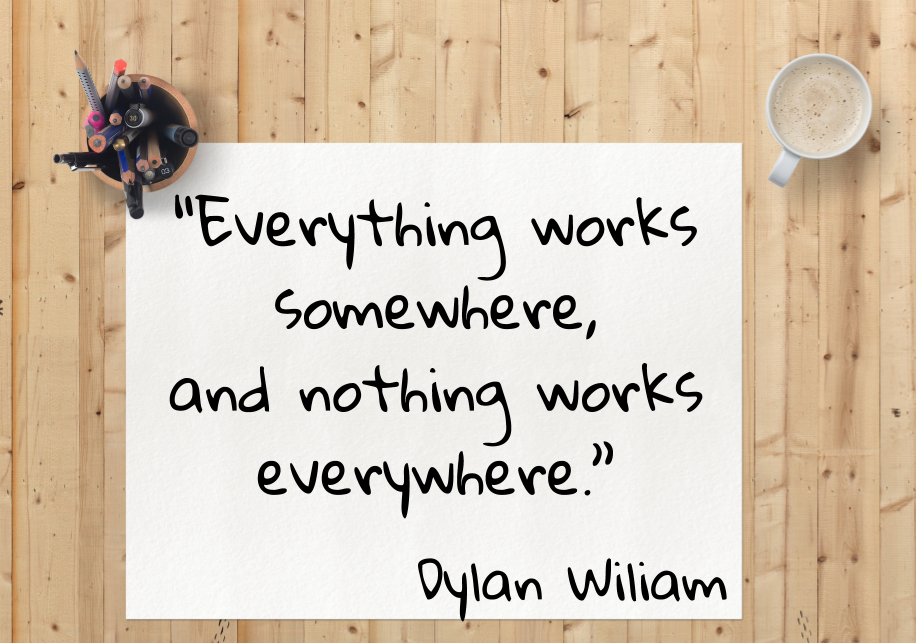
If you are considering modifying the traditional classroom model, you will want to be familiar with the ideas that follow. Although there are advantages and disadvantages to each, I am reminded of a quote by Dylan Wiliam, a man whose work on formative assessment changed the way I think about teaching and learning. Wiliam cautions against telling teachers what to do because, “Everything works somewhere, and nothing works everywhere (Wiliam, 2014).”  In other words, there is no perfect solution. Teachers must educate themselves on the various options and then choose the option with which they are most comfortable and that best meets the needs of their students.


Online Learning:

Students engaged in online learning are not impacted by the limitations and/or advantages of a physical classroom. Students receive all instruction and content virtually, using a computer or other device.  Proponents of this type of delivery argue that access to online learning opportunities improves equity by leveling the playing field for all students (iNACOL, 2015). The 2017-18 Pupil Accounting Manual, published by the Michigan Department of Education provides key insights into requirements and protocol for cyber schools (online schools). This is an excellent resource for anyone seeking a better understanding of Michigan's requirements for intermediate school districts, local districts, and public school academies.


Blended Learning:
Blended learning uses a combination (or blend) of classroom learning and online learning (Tucker, 2013). When teachers combine both traditional and online instruction, they create multiple pathways for students to achieve success (iNACOL, 2015). In most blended models, the students are able to control - at least to some degree - the time and place of their learning.  Additionally, since much of the content is delivered online, students can control the pace at which they progress through the curriculum/content (Tucker, 2013). Michigan educators will find specific guidance for offering blended learning opportunities within the Pupil Accounting Manual 2017-18, published by the Michigan Department of Education.


Personalized Education:
Personalized Education provides students with a choice and voice in their own education.  Personal learning plans are created using key data regarding students' current level of mastery. Once the learning plan is created, student-centered instruction is provided along with consistent progress monitoring.  As students master specific skills and concepts, they progress through the curriculum/content.  Personalized learning enhances instruction and provides each student with his/her own learning pathway (iNACOL, 2015)


Competency Education:
iNACOL defines competencies as “explicit learning objectives that empower students (2015).”  In this model, teachers provide students with timely feedback and differentiated support. When learning objectives and their criteria for success are clear to students and meaningful feedback is provided, students are much more likely to hit the learning targets (Leahy, Lyon, Thompson, Wiliam, 2005). As learning objectives are mastered, students advance.  


In conclusion, regardless of which model (or combination of models) you may choose for your class, Moodle can help you achieve your goals. Check out Moodle'sconditional activity feature which can can support all of the models listed above by releasing content based on specific criteria and tracking what students have already completed. Moodle is a fully customizable Learning Management System that can help you change the way in which you deliver instruction.


Resources:


"Our Work - iNACOL." iNACOL.org. N. p., 2017. Web. 11 Oct. 2017.


Leahy, S., Lyon, C., Thompson, M., & Wiliam, D. (2005). Classroom assessment: Minute by minute, and day by day. Educational Leadership, 63(3), 18–24.

Michigan Department of Education. "Pupil Accounting Manual: 2017-2018." (2017). Web. 11 Oct. 2017.

Tucker, Catlin R. "Technology-Rich Learning: The Basics of Blended Instruction." Educational Leadership. ASCD, Mar. 2013. Web. 10 Oct. 2017.


Wiliam, Dylan. “Why Teaching will Never be a Research-Based Profession and why that’s a Good Thing.” ResearchED. Sep. 2014. Web. 8 Oct. 2017.

Tuesday, September 26, 2017

Modern Day Moodle

If you’ve been involved in online learning during the past decade, you have probably heard of Moodle. Moodle is an open-source LMS (Learning Management System) used by many schools and businesses around the world.  This learning platform was created to provide educators and students with a robust, secure, and integrated system to house their learning environment.  Simply put, it’s an extension of your classroom that provides students with 24/7 access to course content and materials.

The fact that Moodle is open-source sets it apart from all other Learning Management Systems.  Open-source is a term used to describe software for which the original source code is available for reuse and modification by anyone.  Since Moodle is open-source, you don’t need to worry about the price increasing, as is so often the case with many popular, for-profit Learning Management Systems. 

Although Moodle has been around for many years, it is still a viable option for many schools and districts, especially those in Wayne County. Wayne RESA offers Moodle 3.3 at NO-COST to our local districts. We not only host your Moodle instance, but we also provide tech and instructional support as needed.

If it’s been awhile since your last Moodle experience, I encourage you to check out the newest version.  Thanks to the creativity of Chris Kenniberg, web-master for Dearborn Public Schools, today’s Moodle barely resembles the cumbersome versions of the past.  Kenniberg’s latest Fordson Theme with its slick, modern design and easy to navigate options, is a true game changer for Moodlers.

Picture of Moodle course with the Fordson Theme applied. The site is simple, streamlined and visually appealing.


For more information about how you can get started with Moodle or on ways to enhance your current Moodle learning environment, please contact Michelle Wagner at 734-334-1423.

The Following blog was written by: Chris Kenniburg of Dearborn Public Schools Top 3 Ways to Stop Blended Learning Everything you need t...